Download Form W-9 (Rev. March 2024)
The current official Form W-9 and its instructions, straight from the IRS. Both are public-domain documents, and nobody should ever charge you for a blank copy.
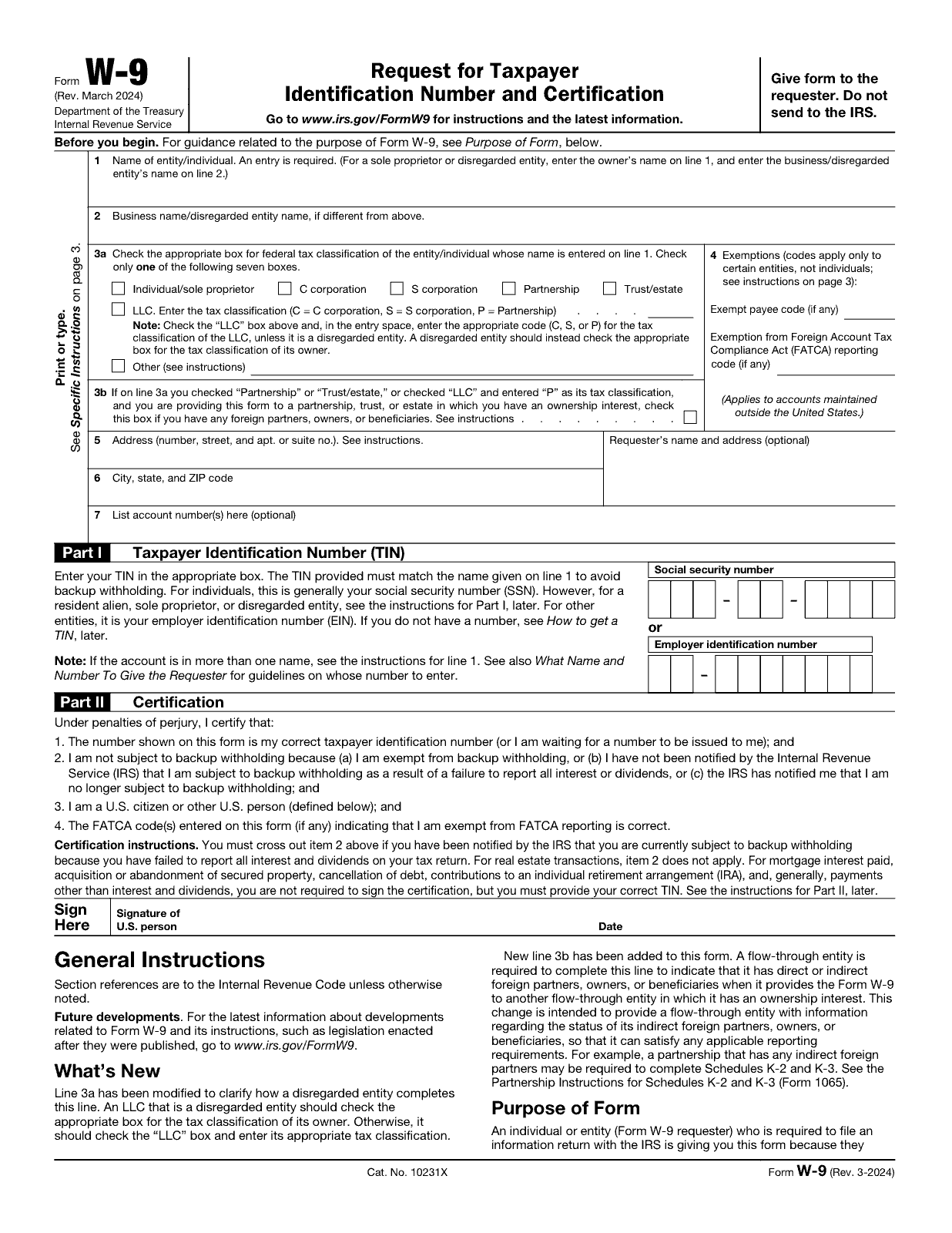
These are unmodified copies of the files the IRS publishes at irs.gov/forms-pubs/about-form-w-9. We host them so the download works even when IRS.gov is slow, and we re-check them against the IRS original. If you would rather take it from the source, download fw9.pdf directly from IRS.gov.
If you have not met this form before, what a W-9 actually does takes two minutes and will save you guessing at Line 3a.
Which file do you need?
| File | Pages | Who it is for | Download |
|---|---|---|---|
| Form W-9 fw9.pdf | 6 (1 to complete) | Payees. The form itself is page 1; pages 2–6 are the instructions for the person filling it in. | Form W-9 PDF |
| Instructions for the Requester iw9.pdf | 6 | Payers. Covers substitute forms, electronic systems, TIN matching, B notices and backup withholding procedure. | Requester instructions PDF |
| Publication 1281 | 20 | Payers dealing with a missing or incorrect TIN, first and second B notices, and the withholding start and stop dates. | Pub 1281 (IRS.gov) |
How to fill in the PDF
The IRS file is a fillable PDF. The reliable way to complete it:
Download the file to your computer first
Do not fill it in inside a browser preview tab. Browser PDF viewers frequently fail to save typed values, so people email back a form that looked complete on their own screen and arrives blank at the other end. Right-click the link, choose Save link as, then open the saved file.
Open it in a real PDF reader
Adobe Acrobat Reader, Preview on macOS, or Edge’s built-in reader all handle the form fields. Type into Lines 1 to 7 and Part I.
Sign Part II
A typed name in the signature field is not a signature. Either print it, sign in ink and scan, or apply a genuine digital signature. When an electronic signature is valid.
Save a copy for yourself
Keep a dated copy of every W-9 you send and note who you sent it to. When a 1099 arrives with the wrong name or address on it, that copy proves what you actually submitted.
Send it through a channel the requester controls
A secure upload portal beats email every time. If email is the only option, put the form in an encrypted archive and share the password separately. Full guidance.
A completed W-9 contains your full legal name, your address and your Social Security number: everything somebody needs to open credit in your name. Browser caches and printer spools on shared and public machines keep copies you cannot see and cannot clear.
Check your copy is current
Look at the top-left corner of page 1. It reads Form W-9 (Rev. March 2024). If your copy shows an older revision date (October 2018 is the one still circulating most widely) it is missing Line 3b, carries outdated instructions, and can be sent back to you by the requester. Old copies get around: they sit in shared drives, in onboarding packets, and in the search results of every site that scraped the form once and never looked again. Check the date before you type anything.
| Revision | Status | What changed |
|---|---|---|
| Rev. June 2026 | Draft, marked DO NOT FILE | A reorganized and expanded instruction layout. The form body is structurally unchanged: the same seven lines, the same two parts, and Line 1 now states plainly that an entry is required. Detail |
| Rev. March 2024 | Current: use this one | Added Line 3b for flow-through entities with direct or indirect foreign partners, owners or beneficiaries. Line 3 became Line 3a. Instructions clarified for disregarded entities and trusts. |
| Rev. October 2018 | Superseded | Post-2017 tax reform update. No Line 3b, so it cannot capture the foreign-partner information a partnership may now need. |
| Rev. November 2017 | Superseded | Minor instruction changes. |
| Rev. December 2014 | Superseded | Introduced the FATCA exemption code field. |
The IRS posts drafts so software vendors and payroll teams can prepare, and every page of one is watermarked DRAFT — DO NOT FILE. A requester who receives a draft should reject it. Until the IRS marks the June 2026 revision final, Rev. March 2024 is the form to use.
Where else you can get it
- IRS.gov is the authoritative source: the About Form W-9 page always links the current revision.
- The IRS will mail you paper copies free of charge if you order them online.
- Many payers send their own substitute Form W-9 or point you at a portal, which is usually faster than a PDF round trip.
- Most accountants and payroll providers keep the current revision on hand.
Form W-9 is a work of the U.S. federal government and is not subject to copyright. Any site charging a fee for a blank W-9, or requiring an account and a credit card before it will let you download one, is selling you something you can get free in one click. Paid services do add real value elsewhere, in e-signature workflows, vendor management and TIN validation. The blank PDF is not one of those places.
Download questions
Is Form W-9 free to download?
Yes. Form W-9 is published by the IRS and is a public-domain U.S. government document. No site should charge you for a blank copy.
What is the current version of Form W-9?
Form W-9 (Rev. March 2024). The revision date is printed in the top-left corner of page 1. A Rev. June 2026 draft exists but is watermarked DO NOT FILE and must not be used.
Can I still use an October 2018 Form W-9?
It is out of date. The October 2018 revision lacks Line 3b, which the March 2024 revision added for flow-through entities with foreign partners, so requesters may reject it.
Prefer not to use a PDF at all?
Our fill-and-print tool asks you a few questions, works out which boxes apply to your entity type, and lays out a clean printable summary you can sign. It runs entirely in your browser. Nothing you type is transmitted or stored anywhere.
General information, not tax advice. This page explains a federal tax form in plain English. It is not legal, tax, or accounting advice, and W9Form.org is not affiliated with the IRS. Verify everything against the official Form W-9 page on IRS.gov and speak to a licensed professional about your own situation. How we source and review these pages.